Follow the tasks outlined in this article to upgrade your Appway installation from version 10.x to 11.x.
You can use this checklist to track your progress and ensure you do not miss any steps (all details are outlined in the related sections):
- Pre-upgrade, requires that you have:
- Verified technical requirements
- Cleaned the 10.x model
- Checked removed and deprecated features, and ensured you are not using features removed in Appway 11
- Verified changes in default behavior
- Prepared custom extensions (if applicable)
- Created a backup
- Upgrade, requires that you have:
- Stopped Appway
- Updated Cluster Storage (if applicable)
- Updated Appway Core
- Updated / installed extensions
- Updated / installed Packages
- Edited
hazelcast.xml - Tested your installation
- Post-upgrade, requires that you have:
- Reviewed changes in default functionalities and changed features
- Verified new features
- (Optionally) Performed other recommended actions
Perform these steps while still running Appway 10.x, as a preparation before the actual upgrade. This is a major upgrade and requires careful preparation and planning.
- Consult the Technical Requirements article (Appway 11 section) to check any possible changes regards to browsers, Application Servers, and JDK. Ensure your system complies with such requirements before continuing with the upgrade.
- Check library updates (added, removed or upgraded libraries) in the sections below. Review your Solution and verify that custom libraries and other extensions are compatible with the outlined changes.
Consider that library updates can also take place in subsequent Appway patch versions. This section is updated continuously with such changes, which are also reported in the related patch version Release Notes.
Review your Solution and verify that custom libraries and other extensions are compatible with the changes outlined above. For a full list of Third-Party Libraries in Appway, check also the related article.
The following libraries were added in Appway 11.0.0:
- Java JWT library (Auth0)
- Apache Tika 1.26
- @reduxjs/toolkit 1.4.0
- immer 7.0.14
- react-redux 7.2.2
- react-virtualized-auto-sizer 1.0.4
- react-window 1.8.6
- react-window-infinite-loader 1.0.5
- redux-saga 1.1.3
- jQuery 3.5.1
The following libraries were upgraded in Appway 11.0.0:
- Hazelcast 3.12.6 to 4.0.3
- react 16.8.4 to 16.13.1
- react-dom 16.8.4 to 16.13.1
The following libraries were replaced in Appway 11.0.0:
- PJL Compressing Filter Java library (used for compressing HTTP responses) replaced with ziplet Java library.
The following libraries were upgraded in Appway 11.0.1:
- Java libraries of the Jackson framework have upgraded to version 2.12.3
- @babel/core from 7.4.0 to 7.14.0
- @babel/plugin-proposal-optional-chaining from 7.13.12 to 7.14.0
- @babel/preset-env from 7.4.2 to 7.14.0
- @babel/preset-react from 7.0.0 to 7.13.0
- @storybook/react from 5.2.3 to 6.2.9
The following libraries were added in Appway 11.0.1:
- react-markdown 6.0.2
- sass 1.32.0
- @storybook/addon-controls 6.2.9
The following libraries were removed in Appway 11.0.1:
- react-marked-markdown 1.4.6
- node-sass 4.12.0
The following libraries were removed in Appway 11.1.0:
- com.google.guava:failureaccess:1.0.1
- com.google.guava:guava:28.1-jre
- com.googlecode.owasp-java-html-sanitizer:owasp-java-html-sanitizer:20160413.1
Consider that this removal also affects the following extensions:
- AWSHazelcastDiscovery
- AzureHazelcastDiscovery
- AzureHazelcastStore
- BusinessDataStorage
- CassandraHazelcastStore
- CloudStorage
- DataStore
- Functions Extension
- IntegrationLinkComponents
- KubernetesHazelcastDiscovery
- OfflineWorklistClient
- RelationalDbHazelcastStore
- StatisticsCollector
- WorkitemFinder
- WorkspaceCollaboration
The following libraries were replaced in Appway 11.1.3:
- log4j 1.2.17 replaced with reload4j 1.2.18.4.
reload4j is a fork of log4j 1.2.17 with fixes for the following security vulnerabilities: CVE-2019-17571, CVE-2020-9488, CVE-2020-9493, CVE-2021-4104, CVE-2022-23302, CVE-2022-23305, and CVE-2022-23307. Furthermore, a potential XML entity injection vulnerability has been fixed. As a consequence of this migration to reload4j, NTEventLogAppender is no longer available in custom log4j configurations of Appway.
The following third-party libraries were upgraded in Appway 11.1.4:
- Jackson Core, Jackson Annotations, and Jackson Module JAXB Annotations from version 2.12.3 to 2.12.6
- Jackson Databind from version 2.12.3 to 2.12.6.1
Before upgrading, go to Solution Design > Validation and run a global validation. Solve any errors or warnings and ensure that the Appway 10.x model is clean before moving on.
It is especially important to make sure that the Appway model is error-free before upgrading. Issues without visible consequences in the current application can cause problems after upgrading.
With Appway 11, a number of features have been deprecated, as their use is discouraged. Features deprecated in Appway 11 will continue to work as before, and we plan to remove each deprecated feature in minimum two years since the date of the release that deprecates the item.
In addition, some features deprecated in previous Appway versions have been removed in Appway 11.
What this means for you:
- Features removed in Appway 11 — Before upgrading, check if any of the removed features are used by your Solution and if so, modify your Solution to work without these features.
For some removed features, you can use the search functionality available at Solution Design > Search to search your Solution for occurrences. For other removed features, follow the explanations in the list of removed features. - Features deprecated in Appway 11 — Deprecated features do not generally require any action before upgrading to Appway 11. Deprecated features, in fact, will continue to work as normal in Appway 11, as they are planned to be removed in minimum two years since the date of the release that deprecates the item, and this time frame gives you plenty of time to check your Solution and implement any needed changes. However, we suggest that you start considering a migration from these features following the recommended actions described in Features deprecated in Appway 11.
Verify the following changes in Appway default behavior and take the recommended actions, if your Solution is affected by such changes.
In the context of the deprecation of the outdated Primitive Types DataLogicConsistency and DataLogicCorrectness, the following Script Functions can no longer be executed by default:
DataLogicConsistency.Issues()DataLogicCorrectness.Issues()
These Primitive Types are replaced by the logic to enable App Task Actions.
We recommend the following:
- If you are using such Script Functions in your Solution, please contact Appway Support to discuss a migration path.
- If you are using such Script Functions to verify the existence of a Data Logic Context, use the new Script Function
DataLogic:IsDataLogicContext instead (see function documentation).
As part a project, started in Appway 10, to remove dependencies from Appway solutions on Java code, several direct and indirect usages of Java in the Script Language generate validation warnings.
In Appway 11, as an evolution of this project, the following usages have been blacklisted:
- Java Reflection API classes (classes that reside in java.lang.reflect.* or sun.reflect.*) in the Script Language. Script Language code that uses such classes will now throw an exception during its execution.
Do not proceed to the Upgrade of your Solution if you are using such classes. If you need assistance, contact Appway Support.
An important change in behavior has been introduced: when the evaluation of default and assignment expressions fails due to a runtime exception, the variable is not initialized to null and the exception is re-thrown. This change affects several Appway components listed below.
The new behavior can be disabled by setting this configuration to false (default is true): property:nm.exprlang.exception.onScopeInitError. However, consider that this configuration property is deprecated and will be removed in Appway 14 or later, therefore we recommend moving to the new behavior.
If you still want to disable the new behavior by setting the configuration property to false, we recommend however that you first test your Solution with the new behavior (configuration property set to true) to check for any possible failures. This will help you strengthen your Solution.
List of affected Appway components:
- Business Rules - When the evaluation of default expressions of Variables defined in a Scope element of a Rule fails due to a runtime exception, the variable is not initialized to null and the exception is rethrown. This causes tokens to be suspended or scripts to fail.
- Data Engine - The reporting of error conditions related to variable initialization has been improved so that they result in local errors instead of making the whole Data Engine to fail.
- Data Logic functions - When the initialization of the variables of the given Data Logic fails, the
DataLogic:EvaluateDataRules function throws an exception. - Data Logic Screens - When the evaluation of default or assignment expressions of a Data Logic Screen fails due to a runtime exception, the variable is not initialized to null and the exception is rethrown. This results in errors in the Screen where the Data Logic Screen is used.
- Data Task and App Tasks - When the evaluation of default or assignment expressions of a Data Task or App Task fails due to a runtime exception, the variable is not initialized to null and the exception is rethrown. This causes tokens to be suspended or scripts to fail.
- Integration Links - When the evaluation of default or assignment expressions of an Integration Link fails due to a runtime exception, the variable is not initialized to null and the exception is rethrown. This causes tokens to be suspended or scripts to fail.
- Mail Extension - When the evaluation of default or assignment expressions in a Screen rendered through the GetScreenHTML function or in a Screen for notification delivery channels fails due to a runtime exception, the variable is not initialized to null and the exception is rethrown. This causes tokens to be suspended or scripts to fail.
- Mail Adapter Extension - When the evaluation of default or assignment expressions of a Screen rendered through GetScreenHTML function fails due to a runtime exception, the variable is not initialized to null and the exception is rethrown. This causes tokens to be suspended or scripts to fail.
- PDF Output - When the evaluation of default or assignment expressions in a PDF Output rendered to PDF fails due to a runtime exception, the variable is not initialized to null and the exception is rethrown, and no PDF will be rendered. This causes tokens to be suspended or scripts to fail.
- PDF Output Table - When the evaluation of default or assignment expressions in the PDF Output Table fails due to a runtime exception, the variable is not initialized to null and the preview fails with no PDF rendered; the exception is shown in the screen.
- Screens - If an exception occurs during the initialization of a Screen variable Scope, or the initialization of a certain Screen variable, the variable is no longer initialized to null and ignored during Screen rendering, but treated as non-initialized and results in red error boxes if the variable is used in the Screen.
An important change in behavior has been introduced in the following cases:
- When the evaluation of default and assignment expressions used to "feed" a Business Object returns a value which is not compatible with the one defined by the Business Object itself, a runtime exception is thrown.
- When the evaluation of default and assignment expressions used to "feed" a Business Object returns a value of type Collection or a Data Class instance and the type defined by the Business Object is String, the value is converted to String as expected.
This change is done to align the Business Object Scope initialization logic with the validation performed in the Script Language.
The new behavior can be disabled by setting this configuration to false (default is true): nm.exprlang.exception.onScopeInitExecuteTypeCheck. However, consider that this configuration property is deprecated and will be removed in two years or later or later since Appway 11.1 release date, therefore we recommend moving to the new behavior.
If you still want to disable the new behavior by setting the configuration property to false, we recommend however that you first test your Solution with the new behavior (configuration property set to true) to check for any possible failures. This will help you strengthen your Solution.
Please note there is a
Known Issue on Appway 11.1.0 only on this new behavior affecting
script functions initializing scopes with primitive type variable assignments (full description below). The issue is fixed on
Appway 11.1.1.
On Appway 11.1.0 only, when the configuration property nm.exprlang.exception.onScopeInitExecuteTypeCheck is set to true (default value for Appway 11.1.0), the Script Functions initializing scopes with primitive type variable assignments fail. Possible affected script functions were: StartProcess, StartSubProcess, Record, Records, List, EVALUATERULE, DataRule:EvaluateDataRules. The issue can be avoided by setting the nm.exprlang.exception.onScopeInitExecuteTypeCheck configuration property to false.
An example of function call that fails:
StartProcess($processReference, {'booleanVariable'=true}:Any)
An example of function call that does not fail:
StartProcess($processReference, {'indexedVariable'=[]:Any, 'dataClassInstanceVariable'=$instance}:Any)
Starting from Appway 11, a change of behavior has been introduced in the export/import of Configuration Business Objects. This change of behavior affects both Appway Studio and the Deployment Extension.
See the One-Click Deployment
document for full details on export/import procedures in Appway 11 and higher.
The change of behavior is represented in the schemas below with the example of Data Classes mapped through Data History Configuration Business Objects.
Consider that the same change applies to all Configuration Business Objects.
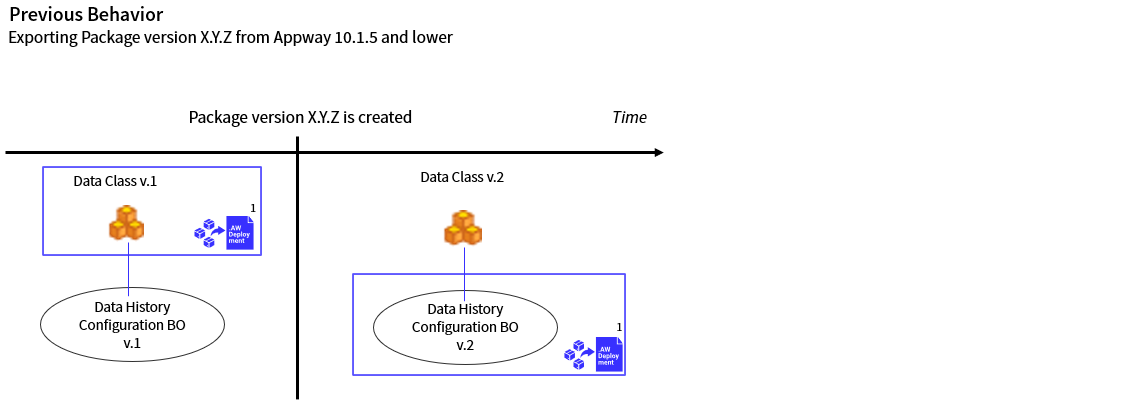
When exporting an .AWDEPLOYMENT file containing Data Classes mapped through Business Data Storage or Data History from Appway 10.1.5 (or lower), the exported .AWDEPLOYMENT file (blue square in the image represents the file content) could contain Business Data Storage/Data History Configuration Business Objects which do not match the corresponding Package version but, instead, match the immediately subsequent version (e.g. if you are exporting the latest Package version, you could have Business Data Storage/Data History Configuration Business Objects corresponding to the 'head' Package version).
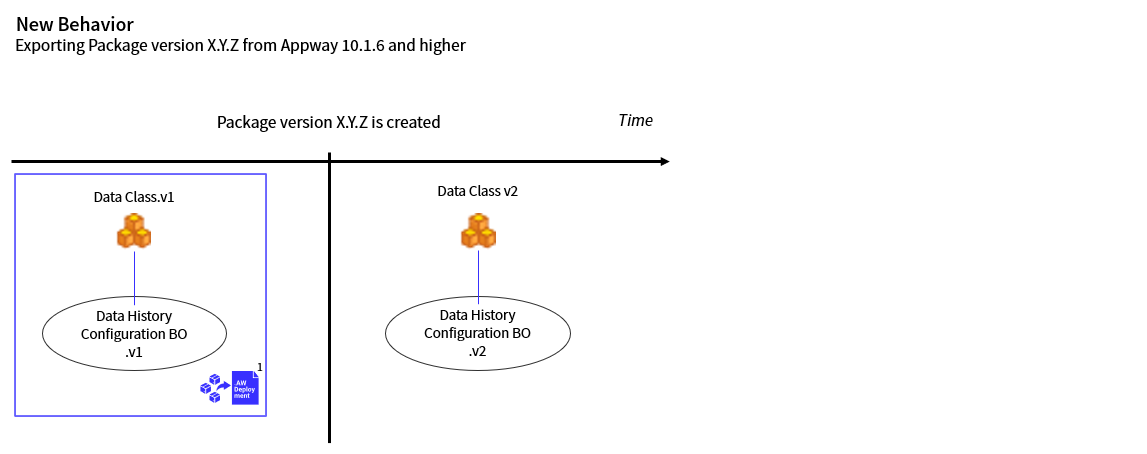
When exporting an .AWDEPLOYMENT file containing Data Classes mapped through Business Data Storage or Data History from Appway 10.1.6 (or higher), the exported .AWDEPLOYMENT file (blue square in the image represents the file content) contains Data History Configuration Business Objects reflecting the corresponding Package version.
Be aware that there is a Known Issue affecting the export logic from Appway 10.1.5 (or lower version) into Appway 11.0.x or higher, now
fixed in Appway 10.1.6 . Check all the information below carefully before proceeding to the upgrade phase. Export and re-import operations through the Deployment Extensions are also affected.
The known issue is represented in the schema below:
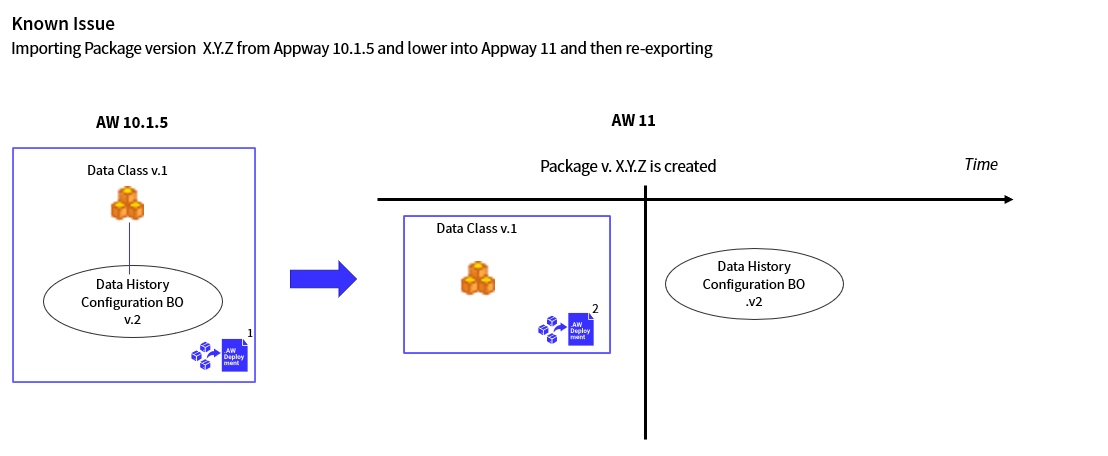
Continuing with the example above, the .AWDEPLOYMENT (1) file (blue square in the image represents the file content) exported from Appway 10.1.5 (or lower) into Appway 11.0.x or higher could contain Data History Configuration Business Objects which did not match the corresponding Package version. When you re-export such file from Appway 11, the new behavior is applied, therefore the .AWDEPLOYMENT (2) file may not contain any Data History Configuration Business Objects, since such objects reflect the 'head' version, which is in conflict compatible with the new behavior.
- Fix version: Appway 10.1.6 and Deployment Extension 12.0.2 (
.AWDEPLOYMENT files exported from these versions will not be affected by this known issue). - Implications for the Appway Platform upgrade: Make sure you follow the update instructions outlined in the next sections and, therefore, you upgrade the Appway Platfom (and avoid upgrading through
.AWDEPLOYMENT import/export). - Further resources:
If your Appway installation contains custom extensions, make sure that they are compatible with the Appway 11 release before upgrading. Contact your Appway representative or Appway Support for more details.
Create a backup of the existing 10.x installation.
Follow the steps in this section to upgrade your system once it is ready.
You will need the following files:
- Latest Appway 11.x version
- Compatible Appway extensions, based on those available in the current environment and the list of mandatory extensions.
- Compatible Appway Packages, including all mandatory Packages for Appway 11 as well as any other Packages which you have licensed and which are provided by Appway, delivered as one or more
AWDEPLOYMENT files.
Run a clean shutdown of the Appway installation to remove any files that are not required. For more information, see Shutting Down a Large Cluster.
With Appway 11.0, one new distributed map was added: deploymentprofiles.
You are affected by this change if you are using the Relational Database provided by the RelationalDBHazelcastStore Extension as your Cluster Storage strategy.
In this case, you might need to add the new deploymentprofiles table manually: check the Database Setup section, and execute the updated DDL statement according to your relational DB implementation (MySQL, DB2, Oracle, MS SQL, PostgreSQL).
To update Appway Core on your application server:
- Open the control center of your application server
- Deploy the new version of the WAR file
Note: For multi-node installations, deploy the WAR file on each node of the Cluster.
Important! If you have customized the
web.xml file, merge your custom
web.xml with the new
web.xml delivered with Appway 11. Make sure that your customized
web.xml includes all new entries delivered with Appway 11. Failure to do so can lead to unexpected behavior in the Appway Studio.
Contact
Appway Support if you require assistance when creating the updated custom
web.xml file.
You need to perform the following actions on extensions:
- Update all extensions currently running on your system.
Important! Update all of the extensions. Even if the version of an extension has not changed and it contains no new features, you must replace it with a version compiled against Appway 11.x.
- Newly install any mandatory extensions for Appway 11 which are currently not available on your Appway installation (see the list of mandatory extensions in the section below).
- Verify if any extension has been removed in the Feature Removal and Deprecation with Appway 11 article, and take the necessary actions (if any).
To update/install extensions, follow these steps:
- Install / update the extensions by adding them to the
<Local file system>/data-home/extensions directory. When updating extensions, make sure you update only the JAR files; any CFG files should remain the same as on your 10.x system, in case you made any custom configurations.
Note: For multi-node installations, install / update the extensions on each node of the cluster.
- Make sure every extension has the proper name and is unique:
- One JAR file per extension, with the proper file name of the type OfficialExtensionName.jar must be present.
- Any other redundant JAR files with custom prefixes or suffixes (such as OfficialExtensionName-1.2.3-11.0.0.jar or dev-OfficialExtensionName.jar and so on) must be removed.
- After starting Appway, ensure the extensions are started at System Configuration > Extensions in Appway Studio.
Mandatory extensions are an essential part of the Appway Platform and must be installed on every Appway instance. If these extensions are not installed and running, Appway itself is not considered correctly installed and set up. Mandatory extensions provide important features and strengthen the available analytical capabilities allowing you to tune your Appway installation and ensure maximum platform stability.
Ensure the following mandatory extensions are installed on your system:
- AppTask — Includes all the logic behind the autogeneration of the Data Driven UI and the logic to apply a Theme to such UI. This extension is used by the Data Gathering App Task.
- AppTaskAPI — Exposes the API used to communicate with the backend (Data Logic, Theming, Process). This extension is used by the Data Gathering App Task.
- ClusterTools — Provides insights into the internals of Appway Cluster and Hazelcast (see documentation).
- Component — Contains most of the Screen Components available in Appway.
- DefaultIcons — Adds generic Workspace icons for use with Screen Components and in Solutions.
- Functions — Provides many additional functions vital to working in Appway.
- ProcessUsageTracker — Collects usage statistics (started, updated, stopped) for top-level Processes in Appway Solutions. These statistics can be accessed in the license report.
- StatisticsCollector — Collects statistics relevant for testing and tuning Appway installations (see documentation).
- StylePackageTools — Enables a set of tools which support the definition and maintenance of Style Packages.
Note: Ensure the mandatory StylePackageTools Package is available on your Appway instance before starting this extension.
- SystemHealthSensors — Adds additional health sensors to the Appway Health Service (see Health Sensor documentation).
- WorkitemFinder — Provides out-of-the-box filters as well as sorting, paging, and text-based searching capabilities for Workitems (see documentation).
You need to perform the following actions on Packages:
- Install all mandatory Packages for Appway 11 (see the list of mandatory Packages in the section below). If the mandatory Packages are already installed, update them to versions compatible with Appway 11.
- Update all Packages which you have licensed and which are provided by Appway to versions compatible with Appway 11.
To update/install update Packages, follow these steps:
- Place the
AWDEPLOYMENT files containing the Packages into the packages folder in the Data Home (<Local file system>/data/packages). The Packages are then automatically installed when Appway is started. See Importing Packages for more details on installing Packages automatically. - If you prefer to install / update Packages manually, install / update them at Solution Design > Import in the Studio after starting Appway.
Note: Updating Appway Packages such as the Design System will overwrite any custom changes you have made for such a Package. In general, modifying Packages managed by Appway is not recommended, as upgrading becomes more difficult.
Mandatory Packages are an essential part of the platform and must be available on every Appway instance. If these Packages are not installed (or not updated to a version compatible with Appway 11), Appway itself is not considered correctly installed. Mandatory Packages provide important features and functionality allowing you to use your Appway installation more effectively.
Ensure the following mandatory Packages are installed on your system:
- Design System — Provides patterns, prebuilt modules, and styling to enable the straightforward implementation of a cohesive brand experience.
- Style Package Tools — Together with the mandatory Style Package Tools extension, enables a set of tools which support the definition and maintenance of Style Packages (see documentation).
- Data Logic — Provides a Solution template and utility functions that enhance Appway's native Data Logic functionalities.
Download mandatory Packages from the
Products page on community.appway.
Hazelcast has been updated to version 4.0 in Appway 11.
You are affected by this change if you modified the $dataHome/conf/hazelcast.xml config files. In this case, you may need to manually update them.
Consider, for example, that the following changes have occurred:
- Property
<group> has to be replaced with <cluster-name>
Note that the cluster name (previously group name) must consists only of the following characters only: a-zA-Z._-.
- Property
<management-center> must be removed - XML Schema location will be updated automatically
If you did not edits these parts of the config files, you are not affected by this change and the the migration will be performed automatically.
After performing the actual upgrade, follow these steps to test your installation:
- Start Appway.
- When completely started, check the log output of the startup. Carefully examine all errors and warnings before continuing to the Studio.
- Check that the Appway version number has been updated in System Maintenance > Overview.
- Check that extension version numbers have been updated in the System Configuration > Extensions > Version column.
- Re-run the Validation report (Solution Design > Validation). Browse the validation logs (Show Validation Logs) and use its diff viewer to compare versions. Apply fixes for any new errors or warnings.
- Thoroughly test your Solution.
Perform the steps outlined in the following sections when Appway 11.x is running.
As part a project, started in Appway 10, to remove dependencies from Appway solutions on Java code, several direct and indirect usages of Java in the Script Language generate validation warnings. We recommend you plan moving away from such usages, as they may be blacklisted in the next Appway versions.
Make sure you have checked blacklisted Java usages in the Pre-upgrade
section.
Execution is not affected for validation warnings. However, we recommend that you perform an automatic migration of functions and method calls as a further post-upgrade step. See the Automigration tool description below.
Starting from Appway 11.0.2, a validation error is reported if the Variable property of Data Logic Include Data Rules (available when the Iterative Rule Execution property is selected) starts with a $ sign. This field must contain only the variable name (without the $ sign). The $ sign, in fact, is also visible in the Data Logic Editor UI just before the Variable field to remind the developer not to add a $ sign before the variable name.
These validation and UI enhancements do not have any functional impact and the existing runtime behavior is fully preserved. However, we recommend removing the unnecessary $ sign from the Variable properties (if any) to avoid any unexpected behavior.
Consider that this was true also in previous Appway versions: using the $ sign inside the Variable property could lead to unexpected behavior and issues in the Workspace. However, no validation errors were reported in the Data Logic Editor, therefore this problem was not easily identifiable.
The Blob:File constructor introduced in Appway 11.1.0 has been removed in Appway 11.1.1 to fix a regression issue.
Only if you are on Appway 11.1.0, to avoid the regression issue, import the Package (.awdeployment file) attached here. This Package removes the Blob:File constructor.
See also the Appway 11 Known Issues
article.
Appway 11 brings a host of new features. Adopting these new features is not a prerequisite for successfully upgrading to Appway 11, but the use of these features is beneficial in the long run.
The following list refers to Appway 11. The complete list of features available in the Appway Core Platform will be available with the official release.
- Rule Business Objects have been enhanced with a series of features for better modularity and increased reusability of the business logic, such as the newly added support for variable assignments and the ability to define custom actions in a modeled way thanks to the new Data Action. This simplifies the design and maintenance of business logic and reduces the training time for developers working on Rules.
- The Data Class editor has been extended with advanced capabilities such as type guessing, keyboard shortcuts for frequent operations, and auto-generated default property names. This allows developers to create and modify data models more efficiently and unlocks higher productivity for power users.
- The Data Logic editor has been enhanced with features that support the definition of constraints on Email and Phone number fields, alongside general improvements to the developer experience focused on validation, dependencies, and power user shortcuts.
- Developer and operations productivity
- Integration: We have added platform-native support for JSON Web Tokens (JWT) to enable faster development of cross-system integrations and simplify cross-system authentication and communication, e.g., with 3rd party services used in solutions.
- File and Storage Handling: We are continuing to enhance our capabilities to handle files. We’ve further enhanced the Blob Storage service, added advanced support for secure media type handling, as well as added Azure as our newest Blob Storage Provider.
- Deployment (Import/Export): To enable developers and IT to spend less time and effort while releasing solution updates on a continuous basis, we’ve enhanced our deployment capabilities. Appway 11 comes with a revamped Studio import/export providing more information and customization during import/export operations, capabilities to show the changes in imported Business Objects and improved logs to ensure trackability. Moreover, repeated deployments are simplified through the ability to create and manage a solution as a bundle of packages and configurations.
- Performance, stability and elasticity.
- Appway 11 includes Hazelcast 4.0, bringing a new range of stability and performance improvements to Appway clusters. See dedicated section in this article.
- This new Appway release comes with significant improvements for cluster elasticity, making sure that features, such as Tasks, Jobs, and Sensors, all work seamlessly even if cluster nodes are added or removed from the Appway installation.
The following sections outline further optional and recommended actions to be performed post-upgrade.
To keep your Solution up to date and make sure it uses the recommended functions and methods, we strongly advise performing an automatic migration of functions and method calls as a further post-upgrade step. This is done through the Automigrator Tool described below.
If you have not run automatic migration before, consider that you might get a large number of changes.
Follow these steps:
- Execute
Migration:MigrateFunctions, and pass the Package ID as an argument, as the function executes migration on a per-Package basis.
Example: Migration:MigrateFunctions('ClientOnboarding') migrates all occurrences of deprecated and unrecommended functions and method calls in the 'Client Onboarding' Package.
In detail, the migration function performs the following actions:
- The migration function finds all Business Objects using deprecated and unrecommended functions and method calls within the given Package.
Example – The 'Client Onboarding' Package contains the Script Function Business Object 'Test', which uses the deprecated USERROLES() function:
Function ClientOnboarding:Test(String $value) : Nothing Begin
   USERROLES();
End
- The migration function replaces all such occurrences with new and recommended functions and method calls; an uncommitted version of each Business Object with migrated code is created.
Example – The Script Function Business Object 'Test' has been modified by the migration function to replace the deprecated function:
Function ClientOnboarding:Test(String $value) : Nothing Begin
   User:CurrentUserListRoleIds();
End
- The migration function returns a list of Business Object IDs that have been migrated.
Example:
String[ClientOnboarding:Test]
- Based on the list of migrated Business Objects, review the changes to the Business Objects and commit them.